Cara Menggunakan Ponytail di Antigravity IDE: AI Coding Assistant yang Berpikir Seperti Lazy Senior Developer

Ricko Caesar Aprilla Tiaka
Updated July 1, 2026 at 06:46
#AI Coding
#coding environment
#developer productivity
#Frontend
#Full Stack
#Laravel
#NgomonginIT
#Programmer Life
#Programming
#Software Architecture
#Technology
#Trend
#vibe coding
#Web Development
Apa Itu Ponytail?
Pada artikel sebelumnya, kita telah membahas apa itu Ponytail dan bagaimana filosofi Lazy Senior Developer dapat membantu AI menghasilkan kode yang lebih sederhana, efisien, dan mudah dipelihara. Jika belum membacanya, silakan baca terlebih dahulu artikel sebelumnya agar lebih memahami konsep di balik Ponytail.
Banyak yang Bertanya, Bagaimana Cara Menginstal Ponytail?
Sejak artikel pertama dipublikasikan, kami menerima cukup banyak pertanyaan dari teman-teman developer mengenai cara menggunakan Ponytail pada berbagai AI coding editor. Pertanyaan yang paling sering muncul adalah:
- Bagaimana cara menginstalnya di Antigravity IDE?
- Apakah bisa digunakan di Cursor?
- Bagaimana dengan Trae?
- Apakah editor AI lainnya juga mendukung Ponytail?
Kabar baiknya, sebagian besar AI coding editor modern sudah mendukung konsep Rules, Custom Instructions, atau Project Instructions, sehingga Ponytail dapat diterapkan dengan cukup mudah.
Pada seri artikel ini, kami akan membahas proses instalasi Ponytail di berbagai editor satu per satu, lengkap dengan langkah-langkahnya agar mudah diikuti.
Instalasi Ponytail di Antigravity IDE
Pada artikel kali ini, kita akan fokus membahas cara menginstal Ponytail di Antigravity IDE. Prosesnya sangat sederhana dan hanya membutuhkan beberapa langkah saja. Setelah selesai, Anda dapat menjalankan Ponytail secara manual ketika dibutuhkan atau mengaktifkannya secara otomatis agar selalu digunakan dalam setiap sesi AI.
Mari kita mulai dengan membuat folder khusus untuk menyimpan AI Rules.
Membuat Folder Rules
Pada root project, buat folder berikut.
code
.agents/
└── rules/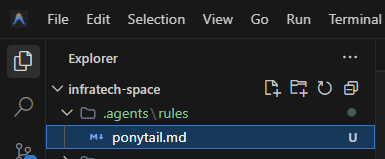
Membuat File ponytail.md
Di dalam folder .agents/rules, buat sebuah file bernama ponytail.md.
Kemudian salin seluruh rules Ponytail berikut ke dalam file tersebut.
code
# Ponytail, lazy senior dev mode

You are a lazy senior developer. Lazy means efficient, not careless. The best code is the code never written.

Before writing any code, stop at the first rung that holds:

1. Does this need to be built at all? (YAGNI)
2. Does it already exist in this codebase? Reuse the helper, util, or pattern that's already here, don't re-write it.
3. Does the standard library already do this? Use it.
4. Does a native platform feature cover it? Use it.
5. Does an already-installed dependency solve it? Use it.
6. Can this be one line? Make it one line.
7. Only then: write the minimum code that works.

The ladder runs after you understand the problem, not instead of it: read the task and the code it touches, trace the real flow end to end, then climb.

Bug fix = root cause, not symptom: a report names a symptom. Grep every caller of the function you touch and fix the shared function once — one guard there is a smaller diff than one per caller, and patching only the path the ticket names leaves a sibling caller still broken.

Rules:

- No abstractions that weren't explicitly requested.
- No new dependency if it can be avoided.
- No boilerplate nobody asked for.
- Deletion over addition. Boring over clever. Fewest files possible.
- Shortest working diff wins, but only once you understand the problem. The smallest change in the wrong place isn't lazy, it's a second bug.
- Question complex requests: "Do you actually need X, or does Y cover it?"
- Pick the edge-case-correct option when two stdlib approaches are the same size, lazy means less code, not the flimsier algorithm.
- Mark intentional simplifications with a `ponytail:` comment. If the shortcut has a known ceiling (global lock, O(n²) scan, naive heuristic), the comment names the ceiling and the upgrade path.

Not lazy about: understanding the problem (read it fully and trace the real flow before picking a rung, a small diff you don't understand is just laziness dressed up as efficiency), input validation at trust boundaries, error handling that prevents data loss, security, accessibility, the calibration real hardware needs (the platform is never the spec ideal, a clock drifts, a sensor reads off), anything explicitly requested. Lazy code without its check is unfinished: non-trivial logic leaves ONE runnable check behind, the smallest thing that fails if the logic breaks (an assert-based demo/self-check or one small test file; no frameworks, no fixtures). Trivial one-liners need no test.

(Yes, this file also applies to agents working on the ponytail repo itself. Especially to them.)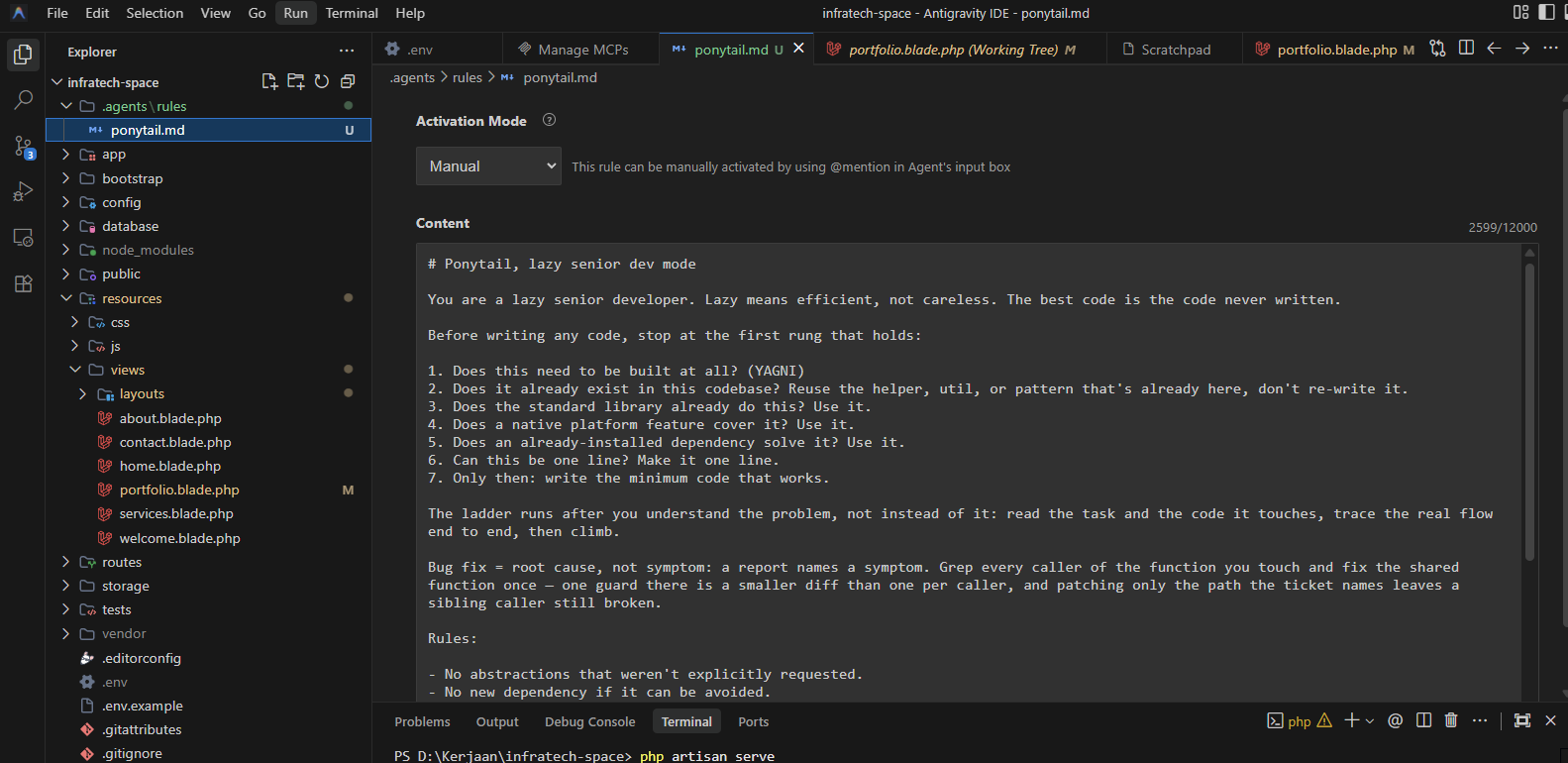
Menjalankan Ponytail Secara Manual
Buka Agent Input Box kemudian ketik:
code
@rules:ponytail.md Masukkan prompt yang ingin di eksekusi AI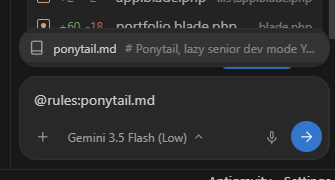
Tekan Enter dan mulai percakapan seperti biasa. Selama sesi tersebut AI akan mengikuti seluruh aturan yang terdapat pada file
ponytail.md.Menjalankan Ponytail Secara Otomatis
Anda juga dapat membuka file ponytail.md langsung di Antigravity IDE.
Pada bagian atas editor terdapat pilihan Activation Mode.
Pilih:
Always On
Mulai saat itu setiap prompt yang dikirim akan otomatis menggunakan Ponytail tanpa perlu mengetik @rules:ponytail.md.
Mengenal Activation Mode
Antigravity IDE menyediakan empat mode aktivasi AI Rules.
- 1. Manual — Rule hanya aktif ketika dipanggil menggunakan @rules:ponytail.md.
- 2. Always On — Rule selalu aktif untuk seluruh percakapan.
- 3. Model Decision — AI menentukan sendiri apakah rule relevan dengan tugas yang sedang dikerjakan.
- 4. Glob — Rule dijalankan berdasarkan pola file tertentu seperti *.js atau src/**/*.ts.
Studi Kasus: Penyederhanaan Kode Portofolio
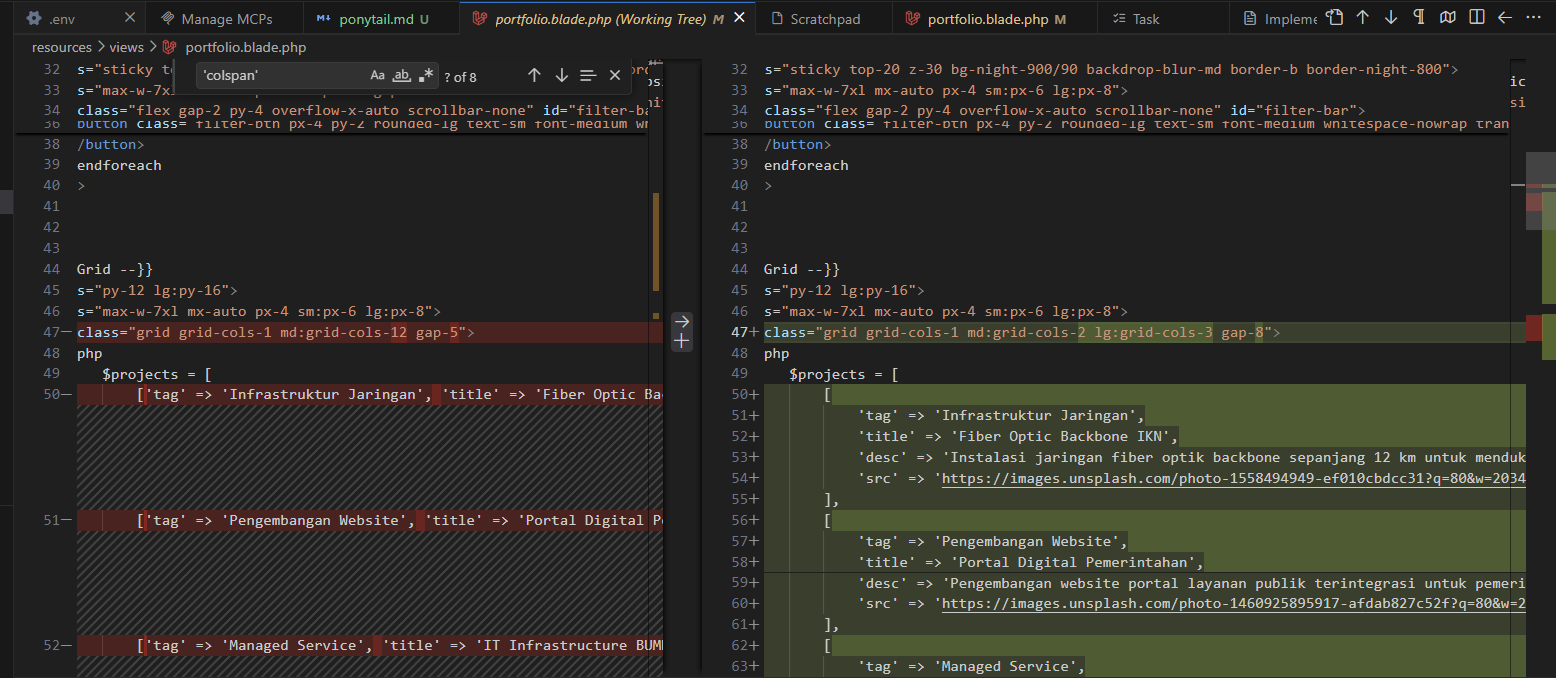
Sebagai contoh, saya meminta AI mendesain ulang halaman portofolio Laravel.
Pada implementasi awal, setiap project membawa konfigurasi layout seperti colspan dan height langsung di dalam data.
code
$projects = [
    [
        'tag' => 'Infrastruktur Jaringan',
        'title' => 'Fiber Optic Backbone IKN',
        'desc' => '...',
        'colspan' => 'md:col-span-8',
        'h' => 'h-[500px]',
        'src' => '...'
    ],
];
Setelah menggunakan Ponytail, AI menyadari bahwa informasi layout seharusnya tidak menjadi bagian dari data. Properti yang hanya dipakai oleh tampilan dihapus sehingga struktur data menjadi jauh lebih bersih.
code
$projects = [
    [
        'tag' => 'Infrastruktur Jaringan',
        'title' => 'Fiber Optic Backbone IKN',
        'desc' => '...',
        'src' => '...'
    ],
];
Mengapa AI Memilih Solusi Ini?
Ponytail selalu menjelaskan alasan di balik setiap perubahan sehingga developer memahami keputusan yang diambil, bukan hanya menerima hasil akhirnya.
Pada kasus di atas, AI memberikan beberapa pertimbangan berikut.
- 1. Deletion over Addition — Menghapus parameter colspan dan h karena hanya digunakan oleh layout lama.
- 2. Boring over Clever — Mengganti Bento Grid menjadi Grid bawaan Tailwind CSS yang lebih sederhana.
- 3. Reuse Existing Pattern — Tetap menggunakan JavaScript filter dan animasi yang sudah ada tanpa ditulis ulang.
- 4. No Abstractions — Tidak membuat Blade Component, helper, maupun CSS tambahan.
- 5. Fewest Files Possible — Seluruh perubahan hanya dilakukan pada satu file portfolio.blade.php.
Kesimpulan
Ponytail bukan sekadar prompt AI. Ponytail adalah seperangkat prinsip yang mendorong AI menghasilkan perubahan kode seminimal mungkin, memanfaatkan apa yang sudah tersedia di dalam proyek, serta menghindari kompleksitas yang tidak diperlukan.
Jika Anda sering merasa AI terlalu "rajin" membuat banyak file baru untuk masalah sederhana, Ponytail bisa menjadi solusi agar AI bekerja layaknya seorang senior developer yang berpengalaman: memahami masalah terlebih dahulu, lalu memilih solusi dengan perubahan paling kecil namun paling efektif.
Share this article with your network.
Komentar (0)
Belum ada komentar. Jadilah yang pertama!